
AI Invoice Processing Case Study: Real Results From Latin America's Largest Helicopter Operator
Measured results, defined metrics and the controls behind them: how the AI invoice processing platform NovaGate Solutions built performs in production at OHI, Latin America's largest helicopter operator.
By Nichita Railean, CTOPublished 11 min read
NovaGate Solutions built an AI invoice processing platform for OHI (Omni Helicopters International), Latin America's largest helicopter operator. Between 8 February and 18 October 2026 it received 1,468 documents. 995 became approved invoices, 78% of them without a single manual edit, and 182 duplicates were stopped at intake. A person approved every invoice; the AI never did. This case study shows how it works, how we count, and what people still do.
AI invoice processing results: the numbers and how we count them
These are measurements from the production system between 8 February and 18 October 2026, not estimates. Every metric has a definition, because the same label can mean different things in different case studies.
| Metric | Result | How we count it |
|---|---|---|
| Documents received | 1,468 | Every file that entered the platform by email or upload |
| Approved invoices | 995 (67.8% of documents) | Invoices with an approval recorded in the audit log |
| Approved with no manual edit | 780 of 995 (78.4%) | No field was changed by a person between the AI's reading and the approval |
| Duplicates stopped at intake | 182 (12.4% of documents) | Same supplier, invoice number, date, amount and currency as an invoice already in the system |
| Non-invoice documents held back | 157 (10.7% of documents) | Payment notices, reminders and statements sent to quarantine instead of the payable flow |
| Approvals made by the AI | 0 | Every approval carries a named user in the audit log |
| Currencies on approved invoices | 3 | US dollars, euros and pounds sterling |
| Master-data changes decided | 156 | 151 approved and 5 rejected by a second person |
What is AI invoice processing, and how is it different from OCR?
AI invoice processing means software reads supplier invoices, pulls out the fields that matter, checks them and routes them to the right person, with a model doing the reading instead of a template. Classic OCR turns an image into text and then needs rules for every supplier layout. Here, a multimodal AI model reads the PDF directly, the way a person would, so a new supplier is not a new project. The model only reads. Plain code then checks the result against master data, and people make the decisions.
That split is why “just add OCR” rarely fixes anything. Reading is the easy part. The expensive parts are checking, routing, approving and filing, and the platform covers all four.
How does an invoice move through the platform?
Follow one invoice from the inbox to the archive. The highlighted stops in the diagram are control gates: places where the platform or a person can say no.
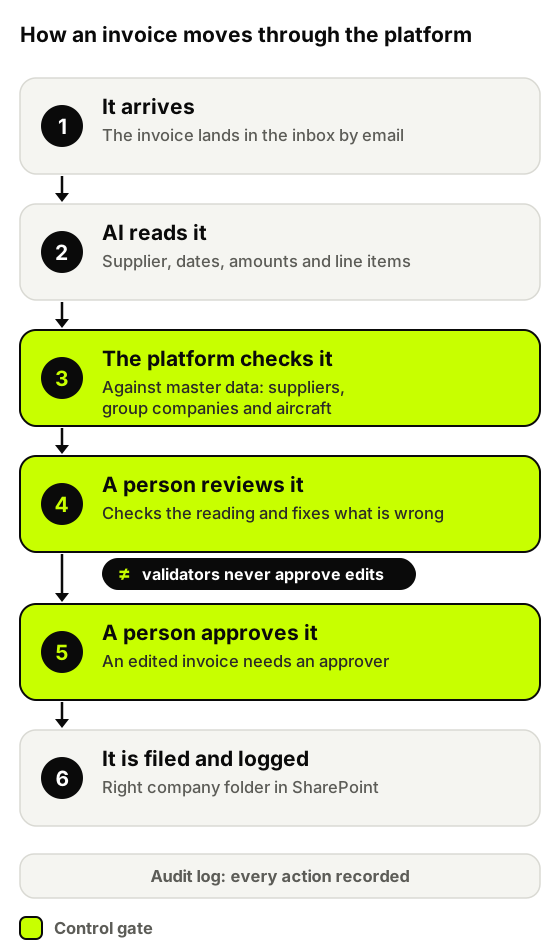
- It arrives. The invoice comes in by email through a dedicated mailbox and enters the platform by itself. A validator can also upload a document by hand.
- AI reads it. A multimodal model, Google's Gemini by default with Anthropic's Claude and OpenAI models as automatic fallbacks, extracts the supplier, dates, amounts and line items from the PDF, whatever the layout.
- The platform checks it. Plain code compares the extracted data with master data (approved suppliers, group companies and aircraft) and gives the invoice a green, amber or red result. Duplicates and non-invoice documents are stopped here.
- A person reviews it. A validator looks at what the AI read and corrects anything that is wrong. Every correction is stored as a before-and-after version.
- A person approves it. If nothing needed correcting, a validator can approve the invoice. If anyone changed a field, the platform will not let a validator approve it: it goes to an approver.
- It is filed and logged. The approved invoice goes into the right company's folder in the client's SharePoint, and every step is already in the audit log.
How accurate is it in production, and what does “touchless” really mean?
Of 995 approved invoices, 780 (78.4%) were approved with no manual edit. We call that the edit-free rate: no field was changed between the AI's reading and the approval. It is not the same as touchless. A person still opens and approves every invoice, because the platform's optional auto-approve setting is switched off at OHI. Counted strictly, the fully touchless rate is 0%, by choice.
Published industry benchmarks put the average touchless rate at roughly a third of invoices and the best performers at about half (see Parseur's benchmark review and Docsumo's touchless guide, which cite Ardent Partners research), but they rarely say how touchless is counted. Compare definitions before you compare numbers. The other 215 invoices (21.6%) had at least one field corrected by a person. We have not published a field-by-field accuracy figure, and we would be wary of anyone who quotes 99% without a sample size.
How does it catch duplicate invoices and documents that are not invoices?
Duplicates were 182 of 1,468 documents (12.4%), roughly one in eight. Suppliers resend invoices and mailboxes forward copies. Left alone, each copy is a payment waiting to happen.
The platform blocks an exact repeat automatically: same supplier, invoice number, date, amount and currency. Near-matches, such as an invoice and its credit note that share a number and date, are flagged for a person instead of being blocked, because blocking a legitimate document is also a mistake. Documents that are not invoices get the same treatment: 157 (10.7%), mostly payment notices, were quarantined instead of entering the payable flow.
What do people still do in an AI invoice workflow?
People still do the work that needs judgment, and that is deliberate. Validators check what the AI read and correct it on about one invoice in five. Approvers sign off every invoice that was edited. People review the near-duplicate flags, and a second person approves every change to supplier master data (151 approved, 5 rejected).
What changed is the kind of work. Nobody retypes an invoice or hunts for the right folder; people check the AI's reading and decide. That is why we say AI invoice processing changes accounts payable jobs rather than replacing them.
The limits are real. The AI can misread amounts, tax or line detail, especially on dense or unusual layouts, which is why a person reviews the result and the platform validates it before anything is approved.
Which controls does an auditor get?
A finance platform is only useful if the CFO can explain it to an auditor. Six controls carry that weight.
- Separate roles. Nobody can hold both a validator and an approver role, and the administrator can hold neither. The roles are enforced on the server, not only in the interface.
- No approving your own edits. A validator cannot approve an invoice that has been edited; it goes to an approver.
- A named person on every approval. All 995 approvals in the audit log carry a user and a timestamp.
- Versioned edits. Every manual change is stored as a before-and-after version, so you can see what the AI read and what a person changed.
- Approved master data. Changes to suppliers, group companies and aircraft need a second person's approval, and every write is logged.
- Safe reprocessing. An invoice can be sent through the pipeline again, and the reset leaves no half-finished state behind.
How does it work with SharePoint and Microsoft 365?
OHI is a group of companies, and each one has its own place in SharePoint. Invoices arrive through a Microsoft 365 mailbox, and the platform routes each approved invoice by OHI's own company-to-folder map into the client's SharePoint. A button in the platform opens the exact location, so “where did that one end up?” has a one-click answer.
The platform itself is hosted, monitored and maintained by NovaGate. The mailbox and the SharePoint archive stay in the client's own Microsoft 365.
What happens when an AI model is unavailable?
AI models limit how many requests you can send them, and any provider can have a bad hour. For a chatbot that is an inconvenience. For an invoice process it is a stoppage, so the platform never depends on a single model. If the first model refuses a request, the invoice moves on to a backup model. If it still gets stuck, the platform retries it every hour by itself and sends an alert email, so nobody has to notice a silence to find out that something is wrong.
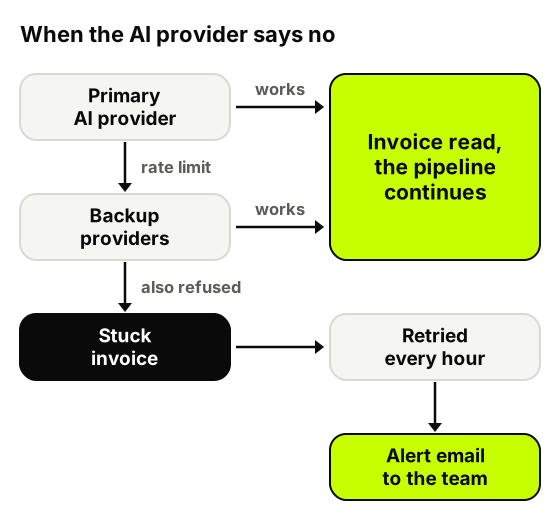
If we built it again, failover would be in the first version. A finance process that depends on a single external provider has a single point of failure with somebody else's name on it.
Build or buy: why did OHI get a custom platform?
OHI is a multi-company group with invoices in several currencies, its own SharePoint structure, its own role model and aviation-specific master data such as aircraft. Packaged accounts payable tools are built around a standard process, and fitting a group like this to one usually means changing the process to suit the tool.
The honest rule of thumb: if your invoices come from one entity, one ERP and standard purchase-order matching, buy first. Build when the shape of your organisation is the difficult part. To size the opportunity either way, use the ROI calculator.
“NovaGate's team takes the time to understand the processes and challenges, translating business requirements into practical and effective solutions. I would confidently recommend NovaGate to any organisation looking for a technology partner that combines technical expertise with a genuine understanding of its clients' needs.”
What we would do again
- Check before a person sees it. Validating against master data first makes the review faster and more meaningful.
- Make roles a server concern. Segregation of duties that only exists in the interface is not segregation of duties.
- Plan for the model being unavailable. Failover and retries belong in the first version, not the second.
- Treat the filing as part of the product. Routing an approved invoice to the right folder is the step a finance team feels every day.
- Define every metric on day one. Version history and the audit log are what let us count an edit-free rate honestly.
Frequently asked questions about AI invoice processing
How accurate is AI invoice processing?
In this deployment, 78.4% of approved invoices needed no manual edit over eight months of production use, and a person checked every one. We report the edit-free rate instead of a field-level accuracy figure, because a headline accuracy number without a sample and a definition tells you very little.
What is a good touchless invoice processing rate?
It depends on how it is counted. Industry reports put the average at about a third of invoices and the best performers at about half, but definitions differ. Decide your definition first (no edit, or no human click at all), then measure it on your own invoices.
Will AI replace accounts payable staff?
It did not here. The work shifts from typing and searching to checking the AI's reading and making decisions. Validators, approvers and finance staff are all still in the loop.
Can AI approve invoices on its own?
Technically yes: the platform has an optional auto-approve setting for clean invoices. OHI keeps it switched off, so every approval has a named person behind it. Whether to switch it on is a risk decision for each company, not a technical one.
What happens when the AI gets an invoice wrong?
A validator corrects it before approval, the correction is stored as a before-and-after version, and the master-data checks and duplicate rules run again. Nothing reaches the archive without a person's approval.
Does it work when every supplier's invoice looks different?
That is the normal case. A multimodal model reads the layout directly, so a new supplier does not need a template. The platform then checks the result against master data and flags what does not fit.
Can it handle SharePoint, Microsoft 365 and several legal entities?
Yes. Approved invoices are filed into the client's SharePoint, in the right folder for each group company, and master data covers suppliers, group companies and aircraft. Invoices in US dollars, euros and pounds sterling run through the same pipeline.
Which AI models read the invoices?
Multimodal models from Google (Gemini), Anthropic (Claude) and OpenAI, with automatic failover between them. Invoice content is sent to the provider for reading, so provider choice, region and data terms are part of the design for every client.
Is AI invoice processing GDPR-compliant?
That depends on the setup, not on AI as such: which provider processes the documents, where, under which contract, and whether your data is used for training. We define and document those choices with each client before go-live. To review them for your case, talk to NovaGate Solutions.
How much does AI invoice processing cost, and how fast does it pay back?
It depends on your invoice volume, the share of manual work and the number of systems involved. The ROI calculator gives you a first estimate in a few minutes, and a pilot on your own invoices gives you real numbers.
Where to go from here
If your finance team handles documents across several systems, read what to automate first and what to keep manual, explore the other customer cases or estimate your own potential with the ROI calculator. You can also talk to NovaGate Solutions about a pilot on your own invoices.